

Miners
Fleet composition analytics showing miner counts, type distribution, and status breakdown over time.
The Miners report provides fleet composition analytics, tracking miner counts, type distribution, and operational status over time. Use it to monitor fleet health, plan capacity, and track deployment changes.
For real-time miner status, see the Header and Explorer. For inventory management, see the Inventory Module.
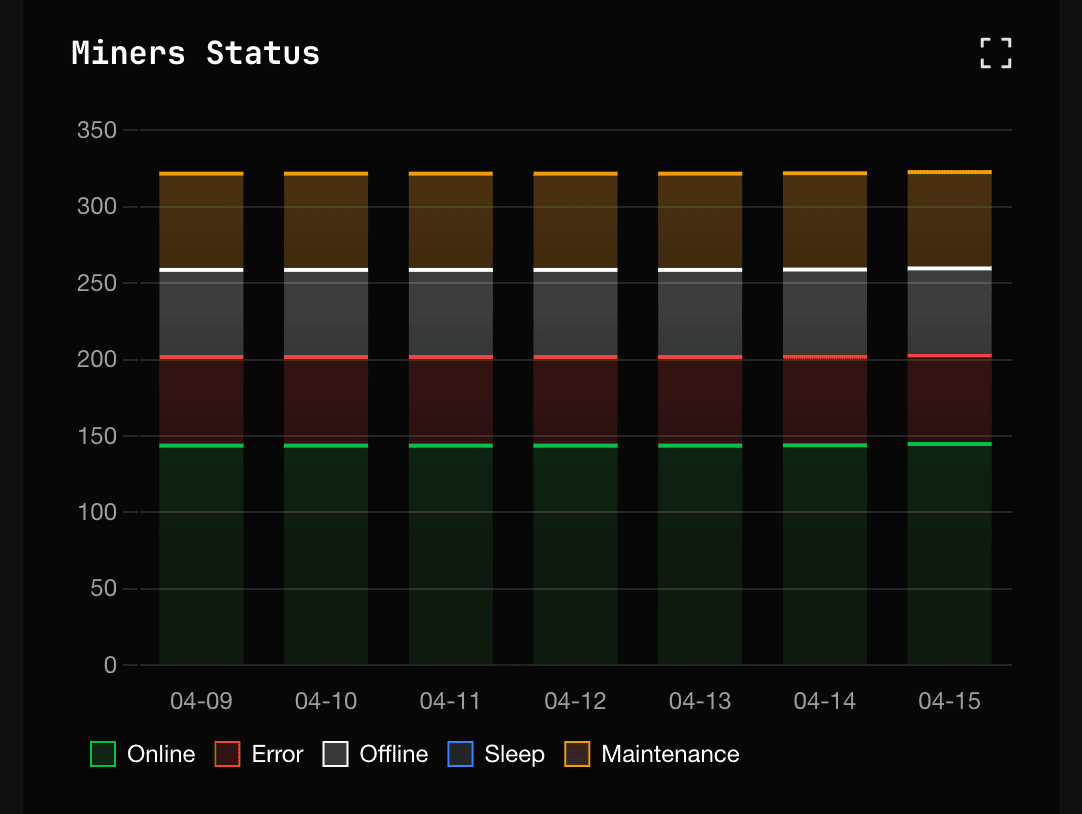
Fleet overview
The Miners report displays a comprehensive view of your mining fleet composition and status.
Miner count trend
| Element | Description |
|---|---|
| Total miners line | Total miner count over time |
| Online miners | Miners in normal operation (green) |
| Error miners | Miners with issues (orange) |
| Offline miners | Miners not responding (red) |
Sudden drops in total miner count may indicate network issues, power outages, or untracked equipment movements. Cross-reference with Inventory Module for reconciliation.
Status distribution
The status breakdown shows operational health of your fleet:
| Status | Color | Description |
|---|---|---|
| Online | Green | Normal operation, producing hashrate |
| Minor Errors | Yellow | Operating with warnings |
| Major Errors | Orange | Degraded performance, attention needed |
| Offline | Red | Not responding or in sleep mode |
| Unknown | Gray | Status cannot be determined |
Miner type distribution
Track the composition of your fleet by miner model over time.
Distribution chart
| Element | Description |
|---|---|
| Stacked bar chart | Miner count by model |
| Percentage labels | Each model's share of fleet |
| Trend indicators | Growing or shrinking model counts |
Miner type summary table
| Column | Description |
|---|---|
| Miner Type | Model name (e.g., S19XP, M30S+) |
| Count | Number of miners |
| % of Fleet | Percentage of total fleet |
| Online % | Percentage currently online |
| Avg Hashrate | Average hashrate per miner |
| Avg Efficiency | Average W/TH for model |
Use the miner type distribution to plan firmware updates, spare parts inventory, and replacement strategies. See O&M: Adding and Updating Miners for fleet management procedures.
Historical status breakdown
Track how operational status has changed over time to identify patterns and issues.
Status history chart
| Element | Description |
|---|---|
| Stacked area chart | Status distribution over time |
| Color coding | Matches status colors (green/orange/red) |
| Hover details | Exact counts at each time point |
Status transition analysis
| Pattern | Indication | Investigation |
|---|---|---|
| Gradual increase in errors | Equipment aging or environmental issues | Review Alerts Manual, plan maintenance |
| Sudden spike in offline | Power or network outage | Check infrastructure, review Widgets Page |
| Cyclical patterns | Scheduled maintenance or environmental cycles | Correlate with maintenance schedules |
| Steady improvement | Successful optimization efforts | Document for best practices |
Fleet health metrics
Summary metrics for overall fleet health:
| Metric | Description | Target |
|---|---|---|
| Online Rate | Percentage of miners online | Above 95% |
| Error Rate | Percentage with errors | Below 5% |
| Utilization | Online hashrate vs theoretical max | Above 90% |
| Stability | Variance in online count | Low variance |
Use cases
| Scenario | How to use Miners report |
|---|---|
| Daily operations | Check online rate and error trends for last 24h |
| Capacity planning | Review fleet growth and model distribution over 30 days |
| Maintenance planning | Identify models with high error rates for batch maintenance |
| Deployment tracking | Monitor new miner additions and status stabilization |
| Incident review | Analyze status changes during incident periods |
Controls
View mode selector
| View | Shows |
|---|---|
| Site View | Total fleet aggregation |
| Miner Type View | Breakdown by model |
| Mining Unit View | Breakdown by container/location |
Date range selector
| Preset | Period | Use case |
|---|---|---|
| Last 24h | 24 hours | Daily operations |
| Last 7d | 7 days | Weekly review |
| Last 30d | 30 days | Monthly analysis |
| Custom | User-defined | Specific investigation |
Export options
| Format | Contents |
|---|---|
| CSV | Fleet composition time-series |
| Distribution charts and tables |
Integration with inventory
The Miners report shows operational data from MiningOS monitoring. For complete asset tracking including non-operational miners, see:
| Need | Use |
|---|---|
| Current miner locations | Inventory Module: Current Site Overview |
| Miner movement history | Historical Device Movements |
| Spare parts association | Spare Parts Inventory |
| Repair tracking | Repair History |
Related documentation
Operations reports
- Operations Dashboard: Unified metrics view
- Hashrate: Computing power analysis
- Energy: Power consumption
- Efficiency: W/TH performance
Real-time monitoring
Fleet management
- O&M: Adding and Updating Miners: Miner management procedures
- Inventory Module: Asset tracking
- Alerts Manual: Miner alerts reference